Editing a User
Update a user's profile, organizational details, and directory-specific settings.
Overview
When you need to change something about a user — their department, title, manager, email aliases, or other profile fields — you do it from the Edit User page. Changes are pushed to your connected directories immediately via API.
To view a user's security posture, app permissions, and SaaS costs without editing, see Viewing a User.
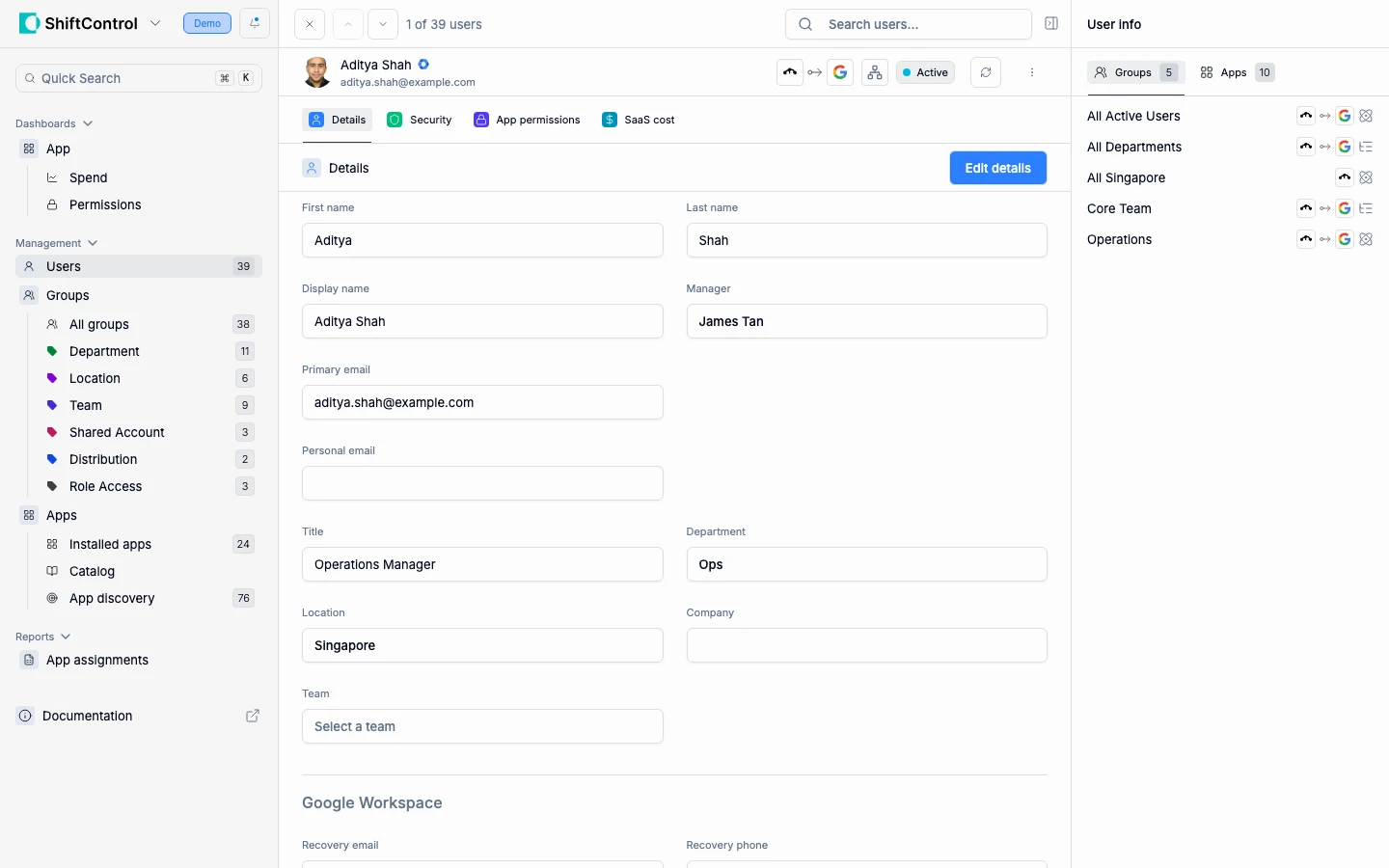
What You Can Edit
Identity Fields
- First Name / Last Name — The user's legal name, reflected across all connected apps and directories
- Display Name — How the name appears in ShiftControl and connected apps
- Primary Email — The user's SSO login identity. Changing this affects all connected services — do so with caution
- Personal Email — Non-work email for activation emails and recovery. ShiftControl saves it as the standard Home email in Google Workspace and as the Alternate email in JumpCloud. If your HR system is connected, it fills this in for you (see HRIS Integration)
Profile Photo
You can set a user's Google Workspace profile picture directly from ShiftControl. Hover the avatar beside their name at the top of their record and click the pencil badge, then pick an image.


The image is written straight to that person's Google Workspace profile, so it appears wherever Google shows them — Gmail, Calendar, Drive, Chat, and the Google directory. There's no separate ShiftControl-only photo to keep in sync.
This matters more than it sounds. A directory full of blank grey initials is the normal state at most companies, because setting a profile picture is a task nobody assigns to anyone. Being able to do it from the same screen where you manage everything else about a person is what makes it actually happen — particularly during onboarding, while you're already in their record.
Requirements:
- Your organization has a Google Workspace directory connected, and
- the user is linked in that Google directory, and
- you have permission to update users.
If your org has Google connected but this particular user isn't linked in it, the control is visible but disabled, with a tooltip explaining why. That's because JumpCloud has no profile-picture surface for ShiftControl to write to — there's nowhere to put the image. If your organization has no Google directory at all, the control doesn't appear.
Things to know:
- Images only, up to 10 MB. Anything larger or non-image is rejected before it reaches Google.
- Google resizes the image. It's stored as a small square thumbnail, so upload something square and reasonably tight on the face — a wide group photo will crop badly.
- Save the user first. The control isn't available while you're still creating a new user; add them, then set their picture.
- This is the same photo digital cards start from. A card's photo defaults to the person's directory picture, so setting it here gives them a proper digital card photo too.
Organizational Details
These fields drive dynamic group memberships and therefore app access:
- Manager — Sets the reporting hierarchy (used in org chart and approval workflows)
- Title — Job title, displayed across connected systems
- Department — Drives department-based dynamic groups. Changing this can immediately add/remove the user from groups and change their app access
- Location — Drives location-based groups and policies
- Company — For organizations managing multiple entities
- Team — More granular than department, with its own group-based assignments
Changing Department or Team can immediately change a user's app access if you have dynamic groups configured. The user may gain or lose access to applications in real time.
Email Aliases
Add alternate email addresses that route to the user's primary inbox. Click Add alias to create a new one.
Google Workspace Settings
Below the standard fields, you can manage Google-specific settings:
- Recovery Email — The email Google uses if the user is locked out
- Recovery Phone — Phone number for Google account recovery
- Show user in global directory — Toggle visibility in the Google Workspace directory
- Email Aliases — Google-specific email aliases
HRIS Integration
If your organization has an HRIS integration (like BambooHR), profile updates can happen automatically. When an employee's details change in your HR system — department transfer, title change, new manager — ShiftControl updates their profile automatically, which triggers dynamic group re-evaluation and can adjust app access in real time.
Personal emails come across too. When a person in your HR system has a personal email, ShiftControl copies it to their Personal Email, and to Google Workspace and JumpCloud, on the next sync. New joiners arrive with it already filled in, and when someone changes it in your HR system, the next sync updates it everywhere. If your HR system has no personal email for someone, ShiftControl keeps the one already on their record, so a blank HR field never wipes it. This works with Deel, Gusto, Rippling, BambooHR, HiBob, Humaans, DreamTeam (Shapes) and Omni HR.
Manual edits are still available for fields not managed by your HRIS.
Things to Know
- Changes propagate immediately. Edits are pushed to your connected directories via API in real time.
- Department/Team changes affect access. Dynamic groups re-evaluate immediately, so changing organizational fields can add or remove app access.
- Primary Email is hard to change. It's the SSO identity across all services. Get it right the first time.
- Deleting a user is permanent. The trash icon permanently removes the user from ShiftControl and your connected directories. Use Deactivate instead if you need to temporarily revoke access.
Related Features
- Viewing a User — Review security, permissions, and costs without editing
- User Management — Return to the full user list
- Adding a User — Create new user identities
- Groups — Understand how groups drive access