Digital Cards Overview
Give everyone a branded digital business card that shares their contact details with a tap or a scan — and that you can retire the moment they leave.
Digital cards is enabled per organization. An admin turns it on under Settings → Features → Digital Business Cards. If you don't see Digital cards under Settings, the feature isn't enabled for your organization yet — talk to your ShiftControl contact.
Overview
Your team meets people. At a conference, in a client meeting, over a coffee — they need to hand over their name, title, email, and phone number. Paper cards go out of date the day they're printed, and per-seat card apps charge you monthly for something that already lives in your directory.
Digital cards closes that gap. You design one branded template for the whole organization. Each employee activates their own card, which comes pre-filled from their directory profile. They get a short public link and a QR code they can show on a phone, drop into an email signature, or print on a lanyard. When they leave, the card follows a policy you set in advance — no one has to remember to clean it up.
How It Works
There are three surfaces, and they map to three different jobs.
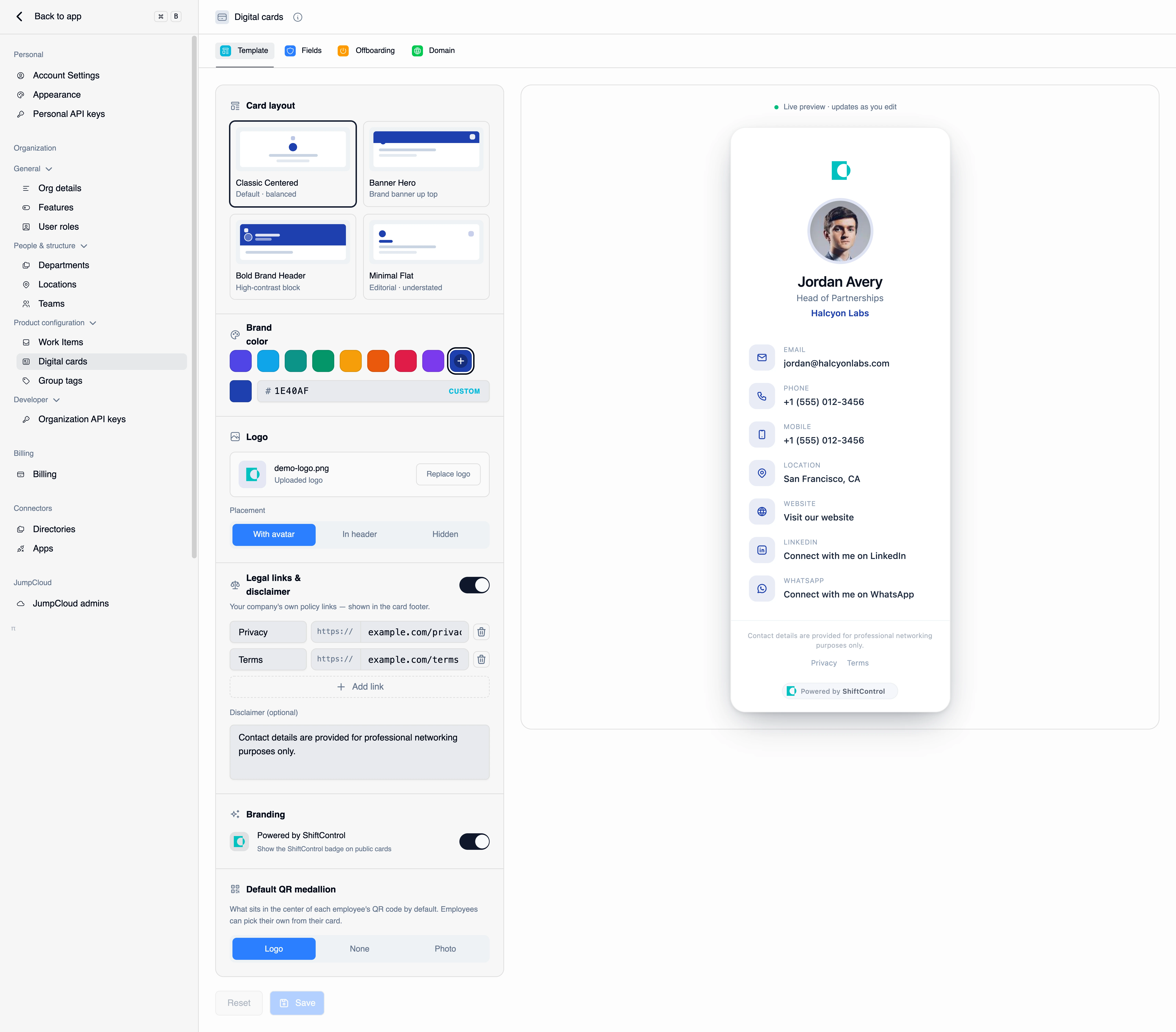
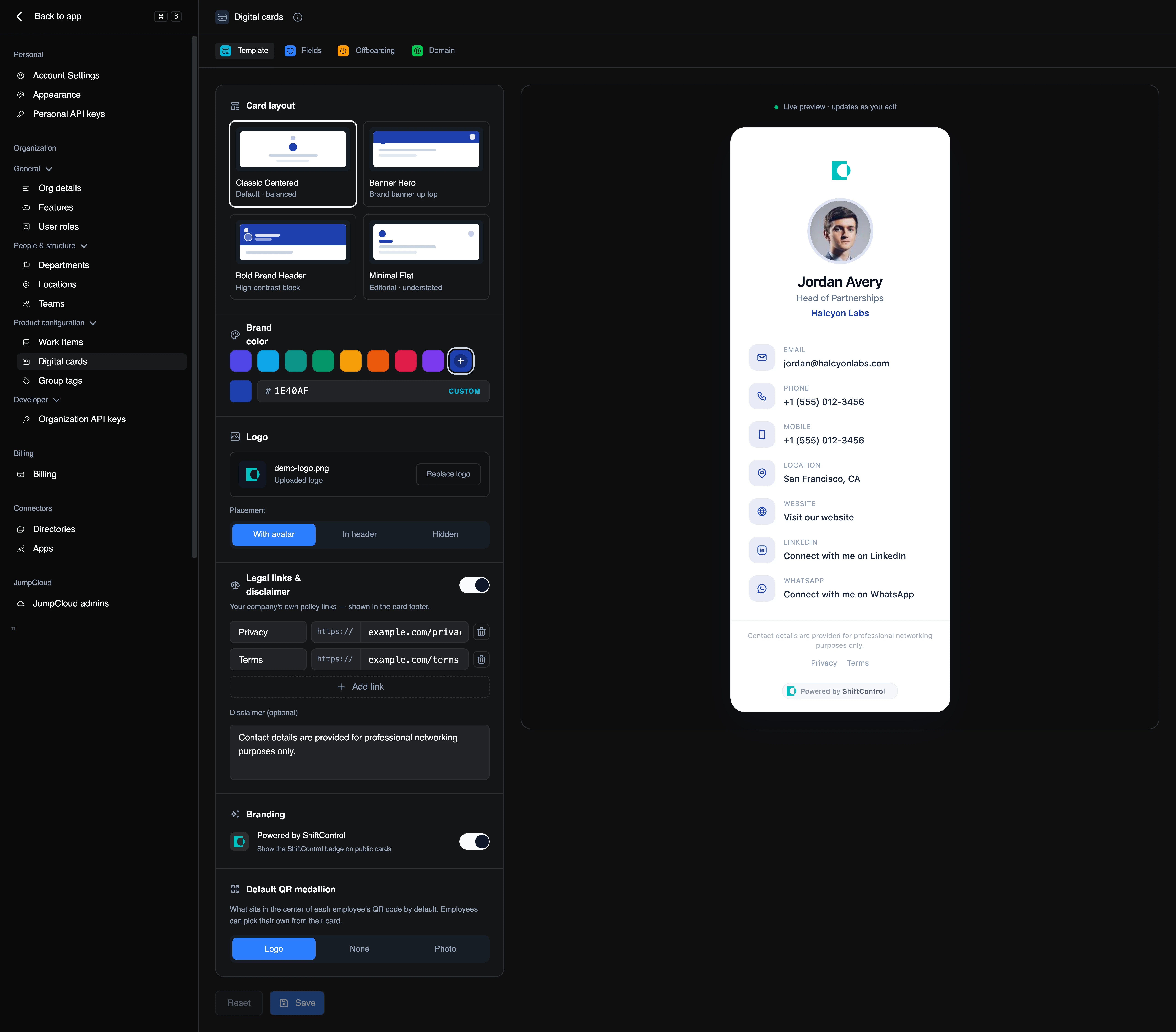
1. You design the template — once. Under Settings → Digital cards you pick a layout, set your brand color and logo, add your legal links, and decide which fields can appear on a card and who controls each one. This is org-wide: every card in your organization renders from this one template.
2. Employees activate and fill in their own card. In the Employee Portal, each person opens My digital card, activates it, reviews the details ShiftControl pre-filled from the directory, and publishes. Nothing is public until they publish.
3. You can drive any individual card yourself. Every user record has a Digital card tab where an admin can activate, edit, publish, unpublish, or permanently delete that person's card on their behalf — useful for executives, for anyone who won't do it themselves, and for offboarding.
Where cards are served from
Published cards are served from ShiftControl's edge network at cards.shiftcontrol.io/{code}, not from the app. Two consequences worth knowing:
- Cards stay fast and available wherever they're scanned, and they don't depend on anyone being signed in to ShiftControl.
- A template change is effectively instant and global. Rebrand the template and every published card in your organization re-renders — you don't reissue links or reprint QR codes.
You can serve cards from your own hostname instead, and links already in the wild on the ShiftControl hostname keep working.
What keeps a card from being a privacy problem
A digital card is a public web page with someone's work contact details on it, so the link itself is the security boundary:
- The link is unguessable. Each card gets a long random code — you can't walk the URL space to enumerate your colleagues, and there's no public directory of cards.
- Cards aren't indexed. Published cards tell search engines not to index them.
- A wrong guess looks like nothing. A bad code returns a plain 404 with no hint that a card ever existed there.
- Links can be rotated. If a card leaks somewhere you don't want it, regenerate the link. The old code dies permanently and is never reissued — and if you rotate by mistake, you can restore the previous link.
- A card can require a PIN before it shows anything.
Common Scenarios
Scenario: Kitting out the team before a conference
Three people are going to a trade show next week. You set the template to your brand color and logo, lock Full name, Job title, and Department so they always match the directory, and make Mobile phone optional so people can choose whether to share it. The three of them activate their cards, add their mobiles, and publish. At the booth they hand out a QR code instead of paper — and when one of them changes title next month, the card updates from the directory instead of being wrong.
Scenario: An executive who won't set up their own card
Your CEO isn't going to log into a portal to fill in a form. You open their user record, go to the Digital card tab, activate the card on their behalf, correct the title to the version they actually use, and publish. They get a link and QR without touching anything.
Scenario: Someone leaves and you don't want a dead link
You set the org offboarding default to Generic card with a 30-day grace period. When someone is offboarded in ShiftControl, their card keeps working for 30 days, then automatically switches to a neutral "no longer with the company" card in your branding. Every business card they ever handed out still resolves to something sensible, and nobody had to remember to do it.
Who Can Do What
| Capability | What it controls |
|---|---|
| View card settings | See Settings → Digital cards at all. Without it the page doesn't appear. |
| Manage card settings | Change the template, fields, offboarding policy, and domain. With view-only access the controls render read-only. |
| Manage organization cards | Activate, edit, publish, unpublish, and delete cards on behalf of individual users, from a user record. |
Employees don't need any admin permission to manage their own card — that's governed by the Employee Portal Cards feature and by the two self-service switches on the Card fields tab.
Things to Know
- One card per person. There's no second card for a different role or a different language.
- Nothing is public until it's published. Activating creates a draft. Publishing is the step that puts a card on the internet.
- Field values are stored separately from the directory. A card field that's been customized isn't overwritten by a directory sync — deliberately, so a manual correction sticks.
- The template is org-wide, not per-person. Individual cards differ in their content, not their design.
- Deleting a card is permanent. The admin-only hard delete purges the card, its images, and its link code, and the code is never reissued.
- A person needs a ShiftControl login to own a card. A directory user who has never signed in can't have one yet — the card tab on their record explains this rather than failing.
Related Features
- Card template — layout, brand color, logo, legal links, and the default QR medallion.
- Card fields — which fields appear, who controls each one, and what employees may do to their own card.
- Card offboarding — what happens to a card when someone leaves.
- Card domain — serve cards from your own hostname.
- Managing a user's card — drive an individual card from their user record.
- My digital card (Employee Guide) — what your employees see.