Card Domain
Put your own hostname on the links your team hands out — without invalidating anything already printed.
Overview
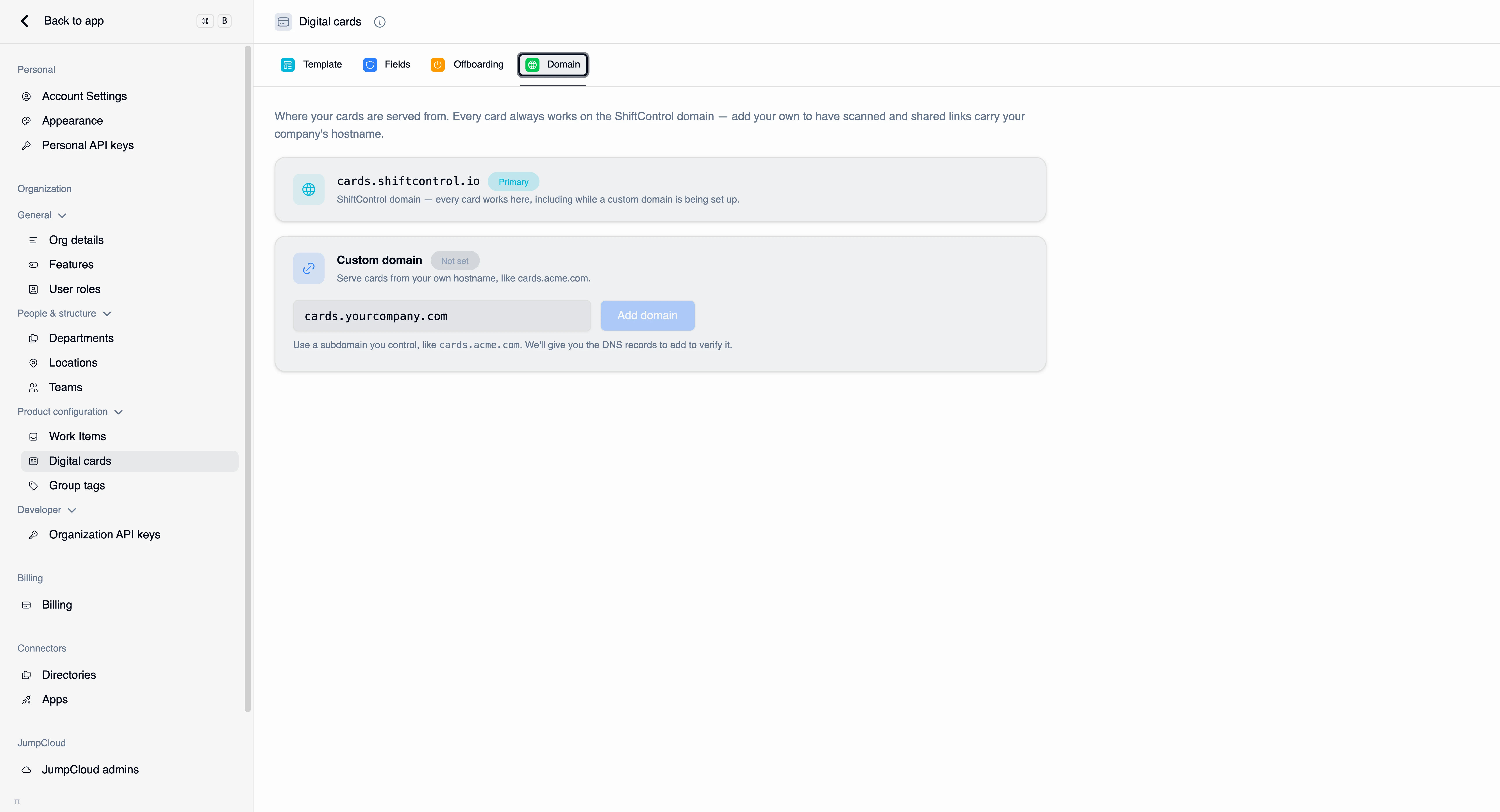
By default your cards are served from cards.shiftcontrol.io. That works, and it's what every card falls back to. But the URL is part of the card: someone scanning a code or reading an email signature sees the hostname, and cards.yourcompany.com reads as yours in a way that a vendor domain doesn't.
The Domain tab lets you add a hostname you control and serve cards from it. Find it under Settings → Digital cards → Domain.
How It Works
Exactly one hostname on this tab carries the cyan Primary badge, so "which hostname do my links use right now?" is answerable at a glance.
- Before you add a custom domain,
cards.shiftcontrol.ioholds the primary slot. - Once your custom domain is verified and serving, it takes the primary slot and the ShiftControl hostname drops below it as a smaller, muted Fallback row.
The ShiftControl hostname is never turned off. Every card always works there, including while a custom domain is mid-setup and after one is live. That's the property that makes this safe to adopt at any point: cards already printed with the ShiftControl URL keep working forever.
Adding your domain
Enter a subdomain you control — something like cards.acme.com — and choose Add domain. ShiftControl then gives you the DNS records to add at your DNS provider so it can verify you own the hostname and issue a certificate for it.
Once the records resolve and verification completes, the domain starts serving and takes over as primary. New links and newly generated QR codes use it.
Point a dedicated subdomain such as cards.acme.com at ShiftControl. Don't try to serve cards from your root domain — that's where your website lives, and the two can't share the hostname.
Verification can't complete until your new records have propagated. If it doesn't verify immediately, that's usually propagation rather than a mistake — re-check after your provider's TTL has elapsed. Meanwhile every card keeps working on the ShiftControl hostname.
Common Scenarios
Scenario: Moving to your own hostname after a pilot
You rolled cards out to the sales team on cards.shiftcontrol.io and it went well. Now you want the company hostname. You add cards.yourcompany.com, add the DNS records, and wait for verification. When it goes live, it becomes primary and new shares use it — and the QR codes from the pilot, printed on the ShiftControl hostname, keep resolving. Nothing gets reissued.
Scenario: Deciding whether it's worth it
You're a ten-person company and nobody looks closely at the URL under a QR code. The ShiftControl hostname is fine and requires no DNS work — skip it. Revisit if you start printing cards at volume or your brand team asks.
Things to Know
- The ShiftControl hostname is permanent. It stays a working fallback for every card, forever. Adding a custom domain never breaks an existing link.
- One hostname is primary at a time, and it's the one badged Primary.
- Verification needs DNS access. You'll need someone who can add records for the domain.
- Existing QR codes don't change. A code encodes the URL it was generated with. Regenerate a QR code from a card if you specifically want the new hostname on it.
- View-only admins see this page read-only. Without Manage card settings, the controls render disabled.
Related Features
- Digital cards overview — how cards are served and why links are unguessable.
- Card template — the rest of your card branding.
- My digital card (Employee Guide) — where employees copy their link and download QR codes.