Shapes
Connect Shapes to ShiftControl and make HR data your single source of truth for user management.
Overview
Shapes was formerly known as DreamTeam. The Shapes connector allows you to connect your Shapes system to ShiftControl, enabling HR data to become the single source of truth for user management across your organization. This connector streamlines user provisioning, updates, and lifecycle management based on your HR records.
Why It Matters
- HR-Driven Identity: Your HR data becomes the single source of truth for identity management
- Clean User Records: Maintains accurate user information during organizational changes
- License Optimization: Saves on JumpCloud licenses by creating users only when needed
- Automated Lifecycle Management: Automatically handles user provisioning, updates, and deprovisioning
Advantages Over JumpCloud's Built-in Connector
Our Shapes connector offers several improvements over JumpCloud's native connector:
- Full Field Synchronization: Manager and other key attributes now flow through completely
- Scoped Credentials: Supply ShiftControl with a limited Shapes token (no need to share JumpCloud super-admin credentials with Shapes)
- Cost Savings: Unlike JumpCloud's native integration that may create staged users before their start date (costing you license fees), ShiftControl creates users only when actually needed
How It Works
- Regular Synchronization: ShiftControl polls Shapes regularly and compares records
- Comprehensive Change Detection: Automatically detects adds, updates, disables, and re-enables
- Smart Pre-start Provisioning: 5 days before a new hire's start date, we enable the account in silent mode so Gmail, Calendar, and Docs are ready without emailing the user
Retrieving Shapes Tokens
ShiftControl uses your Shapes API tokens to read employee data. To retrieve them, sign in to your Shapes account and go to: https://app.shapes.co/my-settings
Sign in to Shapes
Sign in to your Shapes instance with administrator permissions.
Open Your Settings
Navigate to https://app.shapes.co/my-settings in your browser (or go to My Settings from the UI).
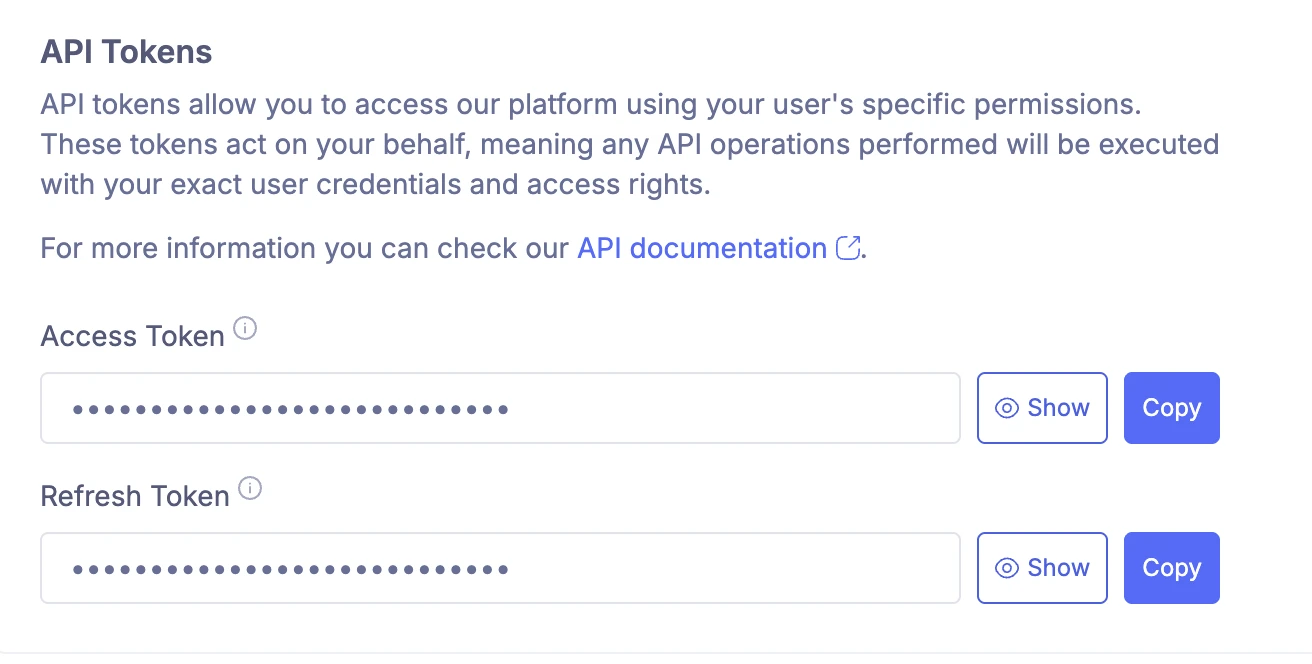
Copy Access and Refresh Tokens
On the settings page, locate the API section and copy both the Access token and the Refresh token. You'll temporary store them on in a text file or secure location. You will provide them to ShiftControl during setup.
Getting Started
Add the Shapes App
Navigate to Integrations → Shapes and select "Add Authorization" in ShiftControl.
Provide Tokens
- Enter the Access token
- Enter the Refresh token
Authorize the Connector
Click "Authorize" to complete the setup. ShiftControl will validate the tokens and begin initial synchronization.
Monitor Synchronization
ShiftControl will begin synchronizing with Shapes automatically — check the connector status page for progress and any errors.
Benefits
- Cleaner User Data: Maintain accurate and up-to-date user information
- Smoother Onboarding: New employees have access to necessary systems before their start date
- Tighter Security: Proper deprovisioning when employees leave
- Reduced Manual Work: Eliminate the need for manual user management tasks